

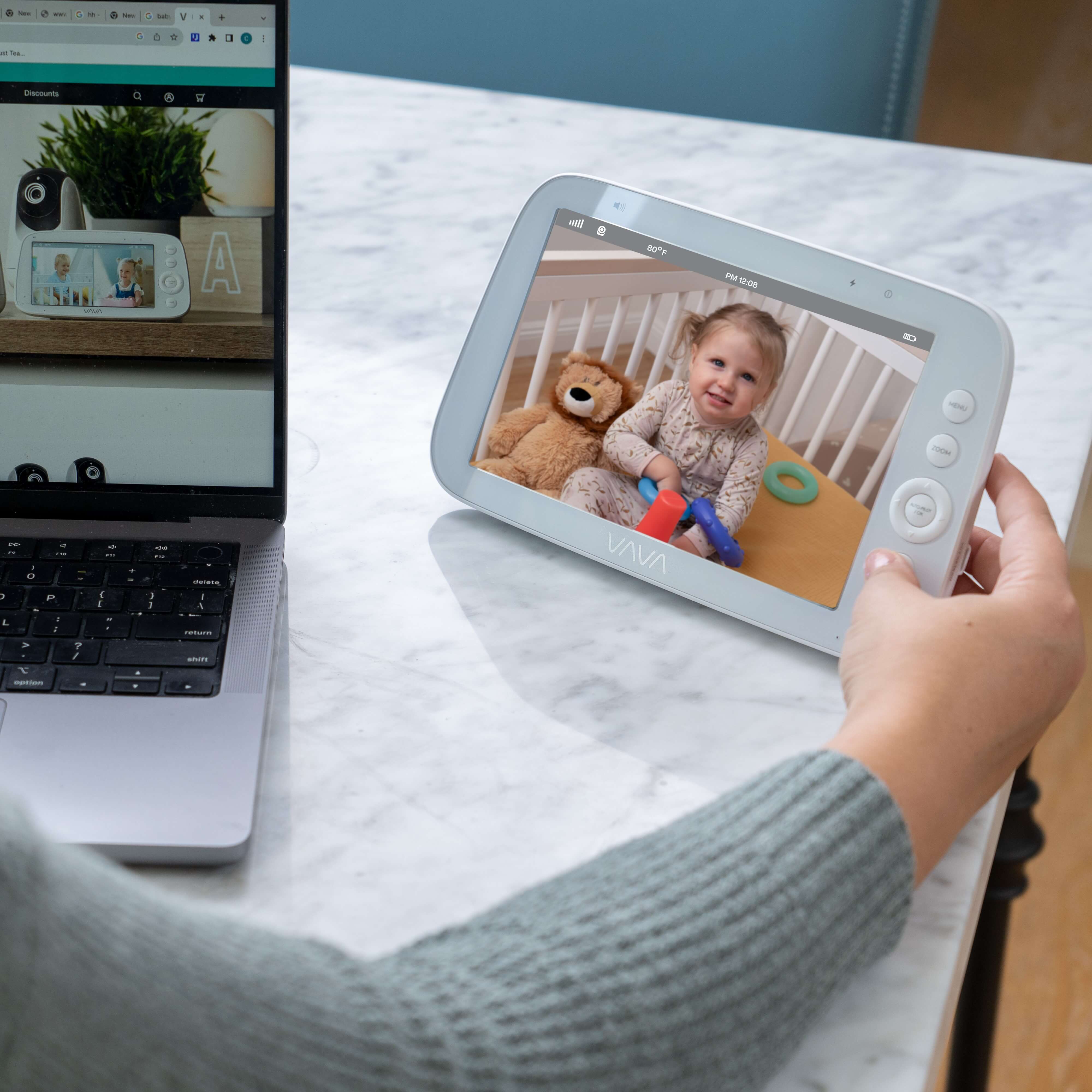
The best baby monitor in 2026 depends on how you want to check on your baby. Some parents want a Wi-Fi monitor with app access, sleep tracking, and smart alerts. Others want a dedicated parent unit they can keep nearby during naps, nighttime checks, and everyday routines at home.
That is why this guide starts with product recommendations instead of only explaining what features to look for.
Below, we compare leading baby monitor options across common needs: best Wi-Fi monitor, best non-WiFi monitor, best large-screen monitor, best split-screen monitor, best budget monitor, and best premium hybrid monitor. We also highlight where VAVA baby monitors fit best for families who want simple in-home viewing with a dedicated parent unit.

Best Baby Monitors of 2026: Quick Picks
|
Category |
Recommended Pick |
Best For |
|
Best Overall Wi-Fi Baby Monitor |
Nanit Pro |
Parents who want app access, sleep tracking, and smart alerts |
|
Best Non-WiFi Baby Monitor for Home Use |
VAVA Baby Monitors |
Parents who want a dedicated screen for simple in-home viewing |
|
Best Large-Screen Non-WiFi Baby Monitor |
VAVA 8-inch 1080P Baby Monitor |
Parents who want a bigger screen and sharper in-home viewing |
|
Best Split-Screen Baby Monitor |
VAVA Split Screen Baby Monitor |
Families watching two rooms, two children, or two camera angles |
|
Best Compact Parent-Unit Monitor |
VAVA 5-inch 720P / 720P PRO |
Parents who want a simple one-room setup |
|
Best Budget Baby Monitor |
VTech VM819 |
Parents who want basic video monitoring at a lower price |
|
Best Premium Hybrid Baby Monitor |
Harbor |
Parents who want both local viewing and app access |
For most new parents, the best place to start is not the longest feature list. Start with your routine. If you want remote access and smart data, look at Wi-Fi models. If you want a screen that stays separate from your phone, look at dedicated parent-unit monitors. If you need to watch more than one space, split-screen viewing becomes much more useful.
Best Baby Monitor Reviews
Before buying a baby monitor, many models can look perfect on the product page. But whether a monitor truly fits your family often becomes clear only after you use it in daily life.
As parents, we usually care about practical questions first: Can I see my baby clearly at night? Will the monitor stay connected from the bedroom, kitchen, or living room? Is it easy for another caregiver to use? Can it support two rooms if our family grows? Are the smart features actually useful, or are they just raising the price?
To make the choice easier, we looked at popular baby monitors across the current market, reviewed common parent feedback, and grouped the strongest options by real-life use case.
Some monitors are better for app access and sleep tracking, some are better for simple private viewing at home, and some are better for larger screens or multi-room setups. The goal is to help you find the option that fits how your family will actually use a monitor day to day.
Best Overall Wi-Fi Baby Monitor: Nanit Pro
Nanit Pro is a strong choice for parents who want a smart Wi-Fi baby monitor, not just a basic live video feed. It makes the most sense if you want to check the nursery from your phone, review sleep patterns, or use app-based features during the newborn stage.
Parents who like Nanit often mention the clear picture, strong night vision, and the convenience of checking the camera from a phone. Some also like that it can provide sleep insights and breathing motion monitoring without using a sock-style wearable.
The trade-off is that Nanit can feel like a lot if you do not actually want those smart features. It is more expensive than many dedicated parent-unit monitors, some features may require a subscription, and the experience depends on app setup and network conditions.
Best Non-WiFi Baby Monitor for Home Use: VAVA Baby Monitors
VAVA baby monitors are a strong choice for parents who want a non-WiFi monitor with a dedicated parent unit. Instead of checking the nursery through a phone app, you get a separate screen that is built for everyday home monitoring.
This type of setup is especially practical during naps and nighttime checks. You can keep the parent unit on a nightstand, kitchen counter, desk, or living room table and check the live feed without opening an app or depending on home Wi-Fi.
VAVA's non-WiFi lineup also gives parents a few different paths. The 5-inch 720P models are better for simple one-room monitoring, while the 8-inch 1080P model is better if you want a larger screen and sharper picture detail. For families watching two spaces, the VAVA Split Screen Baby Monitor is the stronger fit.

Best Budget Baby Monitor: VTech VM819
VTech VM819 is a good fit for parents who want basic video monitoring at a lower price. This type of budget monitor works best for simple needs: hearing your baby, checking the crib, and keeping a small screen nearby during naps or bedtime.
The trade-off is that the screen is smaller and the feature set is more limited than higher-end monitors. You may not get the same screen comfort, camera flexibility, or multi-room support that you would get from a larger or more expandable system.
Best Large-Screen Non-WiFi Baby Monitor: VAVA 8-inch 1080P Baby Monitor
The VAVA 8-inch 1080P Baby Monitor is the better fit if you like the simplicity of a dedicated parent unit but want a screen that feels easier to check at a glance. The 8-inch display gives you more room to see the crib area than a compact handheld screen.
This matters most during nighttime checks. When the monitor is sitting on a nightstand, couch, desk, or kitchen counter, a larger screen can make it easier to see what is happening without leaning close or picking up the parent unit every time.
The 1080P picture also helps if you want sharper detail from a dedicated monitor. For parents who use the monitor often throughout the day and night, that extra clarity can make the experience feel more comfortable.
This model also fits VAVA's no-Wi-Fi positioning. It uses a stable 2.4GHz wireless connection between the camera and parent unit, so the live feed does not rely on a phone app or home Wi-Fi network.

Best Split-Screen Baby Monitor: VAVA Split Screen Baby Monitor
The VAVA Split Screen Baby Monitor is for families who need to watch more than one space at the same time. That could mean twins, two children, a nursery and playroom, or two camera angles in one larger room.
This is where split-screen viewing becomes more useful than simply adding another camera. Instead of switching back and forth between feeds, you can keep two views on one parent unit and see what is happening in both spaces at a glance.
That kind of setup is especially helpful during naps, bedtime routines, or busy parts of the day when one parent is moving around the house. You do not have to choose which room to check first or wait for the monitor to cycle between views.

Best Premium Hybrid Baby Monitor: Harbor
Harbor is a premium choice for parents who want both a dedicated monitor and app access. It fits families who do not want to choose between local viewing at home and remote viewing from a phone.
That flexibility can be useful when different caregivers use the monitor in different ways. One parent may prefer a screen on the nightstand, while another may want to check in from a phone. A babysitter or grandparent may also find a dedicated monitor easier than downloading and setting up an app.
The biggest trade-off is price. Harbor costs much more than many standard video monitors, so it makes the most sense for families who know they will use both local and remote viewing.
If you want one premium system that can handle both screen-based monitoring and phone access, Harbor is worth considering. If you mostly check your baby from inside the home, a simpler dedicated parent-unit monitor may be enough.
Best Compact Parent-Unit Monitor: VAVA 5-inch 720P / 720P PRO
A VAVA 5-inch 720P monitor is a practical choice for parents who want a simple one-room setup. It gives you a dedicated parent unit, video, sound, night vision, and everyday nursery viewing without asking you to use a phone app.
For many first-time parents, that is enough. If your baby usually sleeps in one nursery and you mostly check from nearby rooms, a compact 5-inch screen can be easy to keep on a nightstand, desk, or kitchen counter.
The VAVA 720P Video Baby Monitor PRO is the stronger choice if you like the 5-inch format but want a more upgraded everyday option. It keeps the no-Wi-Fi, private monitoring style while adding a more polished experience for daily checks.
How to Choose the Best Baby Monitor Type for Your Home
After reading reviews and comparing different baby monitor models, it is easy to feel stuck. One monitor talks about app alerts, another highlights privacy, another has a bigger screen, and another supports two cameras. At some point, the question becomes less about which monitor has more features and more about which one actually fits your family.
The easiest way to choose is to start with your main priority. Do you care most about privacy? Faster check-ins? Watching two rooms at once? Or keeping setup simple without another app to manage?
Below, we break baby monitor types down by real parenting needs, so you can match the right monitor to the way you actually check on your baby.

Choose a Non-WiFi Monitor If Data Privacy Matters Most
A non-WiFi baby monitor is worth considering if you want fewer app, account, and cloud-related privacy concerns. The camera connects directly to the parent unit, so daily viewing does not depend on logging into an app or sending video through a cloud account.
This setup can feel easier to manage because there are fewer permissions, passwords, and privacy settings involved. For parents who want a more private nursery-monitoring setup, that can be a major reason to choose a dedicated parent-unit monitor.
Choose a Local-Connection Monitor If Fast Check-Ins Matter
Sometimes you just want to glance at the screen and know what is happening. A local-connection monitor with a dedicated parent unit can make that easier because the screen is already nearby.
You do not have to unlock your phone, open an app, wait for video to load, or sort through notifications. During naps, bedtime, or busy moments around the house, fewer steps can make the monitor feel more useful.
This is where a VAVA non-WiFi monitor fits well. The camera connects directly to the parent unit through a private wireless signal, so quick checks do not depend on home internet, an app account, or cloud setup.
Choose a Larger-Screen Monitor If Viewing Comfort Matters Most
If you often check the monitor from bed, a couch, or across the room, screen size becomes more important. A larger display can make the crib area easier to read at a glance, especially when you are tired or checking from farther away.
For this need, focus on screen size, resolution, viewing angle, and battery life.
Choose a Split-Screen Monitor If You Need Two Views
If you have twins, two children, two rooms, or one nursery that needs more than one camera angle, one view may not be enough. Split screen lets you see two spaces on one parent unit instead of switching back and forth.
Before buying, check both camera support and model compatibility. The useful question is not only whether the monitor supports more cameras, but whether the right camera works with the exact parent unit you choose.
Choose an App-Based Monitor If You Prefer Managing Devices on Your Phone
An app-based monitor may fit families who prefer to manage home devices from a phone. It can also be useful when caregivers want shared app access, connected alerts, or sleep reports in one place.
This type of monitor usually works best for parents who are comfortable with app setup, account login, software updates, and privacy settings.
Choose a Simpler Monitor If You Only Need the Basics
A simpler baby monitor can be enough if you only need clear video, night vision, reliable audio, and a parent unit that is easy to keep nearby. This can work well for one crib, one room, or a smaller home.
The best choice is not always the monitor with the longest feature list. If privacy, fast check-ins, screen comfort, and simple setup matter most, a VAVA parent-unit monitor may be the stronger fit. If phone-based tools and connected reports matter more, an app-based model may be worth comparing.

Which VAVA Baby Monitor Should You Choose?
Once you know what type of monitor fits your routine, the next step is choosing the right VAVA model. The best option depends on your screen preference, how many spaces you need to watch, and whether you want a simple everyday setup or a more expanded monitoring system.
Choose the VAVA 5-Inch 720P Baby Monitor for a Simple One-Room Setup
The VAVA 5-inch 720P Baby Monitor is a good fit if you want a straightforward monitor for one nursery. It gives you the core features most parents need for daily home monitoring: a dedicated parent unit, clear video, sound, night vision, and easy viewing without using a phone app.
Choose the VAVA 720P Video Baby Monitor PRO for a Stronger Everyday Option
The VAVA 720P Video Baby Monitor PRO is a better fit if you like the compact 5-inch format but want a stronger everyday setup. It keeps the practical screen size while adding an upgraded chipset, smoother live viewing, longer battery life, and no-Wi-Fi private monitoring.
This model is a strong middle choice for parents who want something easy to carry around the house but do not want the most basic setup. It works especially well for nap checks, overnight monitoring, and parents who want a private parent-unit monitor without adding app setup or subscriptions.
Choose the VAVA 8-Inch 1080P Baby Monitor for a Bigger, Clearer View
The VAVA 8-inch 1080P Baby Monitor is the better fit if screen size and image detail matter most. The larger display makes it easier to check the crib from a nightstand, bed, couch, or across the room, while 1080P resolution gives you a sharper view than smaller 720P models.
This is the VAVA model to consider if you check the monitor often at night or want a screen that feels easier to read at a glance.

Choose the VAVA Split Screen Baby Monitor for Two Rooms or Two Children
The VAVA Split Screen Baby Monitor is the clearest choice if you need to watch more than one space. That could mean twins, two children, a nursery and playroom, or two camera angles in the same room.
This can be especially helpful during naps when both children are sleeping at the same time, or when one parent wants to keep an eye on two spaces while moving around the house.

Check Compatibility Before Adding Cameras or Replacing a Parent Unit
If you already own a VAVA monitor and want to expand your setup, check model compatibility before buying an add-on camera or replacement parent unit. VAVA's 720P, 720P PRO, 8-inch 1080P, and split-screen systems do not all share the same accessory path.
This matters because the right add-on camera depends on the monitor line you already have. Before purchasing accessories, match the product name and model carefully so the camera, parent unit, and monitor system work together correctly.
Baby Monitor Safety Setup Checklist
Before using a baby monitor overnight, run through these quick setup checks:
- Place the camera outside the crib on a stable flat surface, such as a dresser, table, or shelf, or use a wall mount or compatible bracket for a clearer view of the sleep area.
- Keep cords and monitor parts at least 3 feet away from the crib so your baby cannot reach, pull, or become tangled in them.
- If you use the VAVA Baby Monitor Bracket, attach it securely to a shelf, crib rail, or another stable spot before adjusting the camera angle.
- Test the video view in daylight and with night vision to make sure the crib area is clear.
- Test the sound and signal strength from the rooms where you normally use the parent unit, such as the bedroom, kitchen, living room, or home office.
- For app-based Wi-Fi monitors, use a strong password and keep the app updated.

Conclusion
The best baby monitor in 2026 depends on how you want to check on your baby:
- Choose an app-based Wi-Fi monitor if you want remote viewing, smart alerts, sleep tracking, and phone access from outside the home.
- Choose a dedicated parent-unit monitor if you mostly check your baby from inside the home and want a separate screen that does not rely on your phone.
- Choose the VAVA 8-inch 1080P Baby Monitor if you want a larger screen, sharper video, and a stable 2.4GHz wireless connection for in-home viewing.
- Choose the VAVA Split Screen Baby Monitor if you need to watch two rooms, two children, or two camera angles from one parent unit.
- Choose a VAVA 5-inch 720P monitor or the VAVA 720P Video Baby Monitor PRO if you want a compact, simple setup for one nursery.
For most families, the right choice comes down to daily routine. App-based monitors are better for remote access and smart features, while VAVA baby monitors are strongest for parents who want private, dedicated parent-unit viewing inside the home.
FAQs
1. What features matter most in a baby monitor?
The most useful baby monitor features are clear video, reliable sound, night vision, good range, and an easy way to check the screen. Extra features such as app access, sleep tracking, split-screen viewing, or a larger display are helpful only if they match your daily routine.
2. Is a video baby monitor better than an audio-only monitor?
A video baby monitor is better for most new parents because it lets you see whether your baby is sleeping, moving, or simply making small noises. An audio-only monitor can still work for basic sound checks, but video gives more context during naps and overnight checks.
3. How far should a baby monitor be from the crib?
Keep cords and monitor parts at least 3 feet away from the crib, bassinet, or play yard. Place the camera outside your baby's reach on a stable flat surface, wall mount, or compatible bracket while keeping a clear view of the sleep area.
4. Do I need a baby monitor with sleep tracking?
Not always. Sleep tracking can be useful if you want app-based reports or trends, but many families mainly need clear video, sound, night vision, and a simple way to check the nursery. If you do not plan to use sleep data often, a standard video baby monitor may be enough.
5. How long do parents usually use a baby monitor?
Many parents use a baby monitor through infancy and into the toddler years, especially for naps, separate bedrooms, or multi-room monitoring. The right time to stop depends on your home layout, your child's sleep habits, and how much peace of mind the monitor still gives you.


Share: