

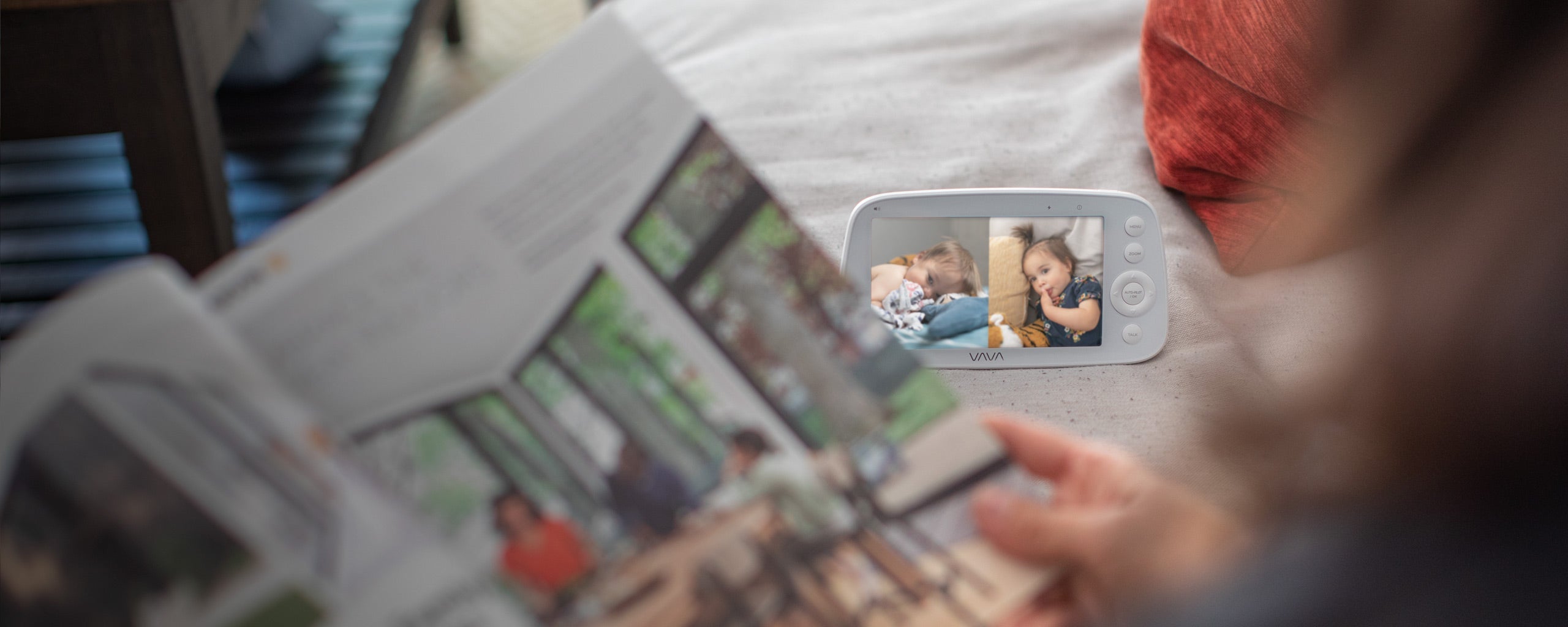
If you regularly check two children or two rooms, a dual camera baby monitor lets you keep both views on one parent unit. One camera can stay in the nursery while the other remains in a toddler's room or downstairs nap space, so neither needs to be moved before bedtime or naps.
Before choosing, check whether two cameras are included, whether both feeds appear at the same time, how the monitor alerts you to sound from each room, and whether both connections reach the places where you normally carry the screen.

What Is a Dual Camera Baby Monitor?
A dual camera baby monitor connects two cameras to one parent unit. Each camera stays in the room or position where it is needed, while the screen brings the views together.
The two feeds may appear in several ways:
|
Viewing Mode |
What You See |
When It Helps |
|---|---|---|
|
Split screen |
Two live views beside each other |
Both children or rooms need attention at the same time |
|
Scan mode |
One full screen view followed by the next |
You prefer a larger image and do not need both rooms visible every second |
|
Manual selection |
One room chosen by the caregiver |
One room is usually the priority and the second is checked occasionally |
Some products arrive as complete two camera sets. Others include one camera and allow another to be added later. A system may connect with four cameras but still show only one or two feeds at a time, so the number of connected cameras and the number of simultaneous views are separate features.

Do You Need One Camera or Two?
You probably need two cameras if moving one camera has become part of the daily routine. Perhaps the baby naps downstairs, then you carry the camera upstairs before bedtime. Perhaps your toddler wakes and needs you while the baby is asleep, but only one room can remain on the screen.
Two fixed cameras remove that repeated setup. Each view is already framed, each cord stays safely routed, and both rooms are ready when nap time or bedtime begins.
|
Your Family's Routine |
A Practical Setup |
Why |
|---|---|---|
|
One baby in one regular sleep space |
One camera |
A single fixed view already covers the routine |
|
A baby and toddler in separate bedrooms |
Two cameras |
You can check either child without moving equipment |
|
Twins in separate rooms |
Two cameras |
Each child keeps an independent view |
|
Twins in two cribs in one room |
One or two cameras |
One wide view may be enough, but two angles help when a crib is partly hidden |
|
Nursery upstairs and regular nap space downstairs |
Two cameras |
Both spaces remain ready without moving and reconnecting a camera |
Do not count every room your child sometimes enters. Think about an ordinary week. If a room rarely needs monitoring, it may not need a permanent camera. If you keep moving the same camera or regularly need to choose between two important views, the second camera is likely to earn its place.

Why Does Split Screen Matter?
Imagine both children are finally in bed. Your baby begins to stir, while your toddler is still turning over and pulling at the blanket. With split screen, you can see both rooms in one glance and decide where your attention is needed.
Without split screen, a two camera system may still make you wait for scan mode to rotate or press a button to change rooms. That may be perfectly comfortable when one child rarely wakes. It is less convenient when both rooms are active at the same time.
Screen size matters because each picture becomes smaller when two views share the display. If the split view still lets you tell whether the baby is sitting up and whether your toddler is still in bed, it is giving you the information you need.
A useful parent unit should also let you open either feed for a closer look. The split view helps you notice what is happening. The larger single view helps when you want more detail or need to adjust the camera angle.

How Should Audio Work Across Two Rooms?
Two live pictures do not always mean two audio feeds play at the same time. Listening to both rooms continuously could also mean hearing two fans, two white noise machines, and every small movement together.
Think about whose room usually needs to be heard overnight. If your baby still wakes for feeds and your toddler usually sleeps through, you may want the nursery audio to remain active while both rooms stay visible. If either child may call for you, a visible sound indicator can help draw your attention to the room that is not supplying the current audio.
These four details determine whether the audio will work for your nights:
- Which camera supplies the sound during split screen viewing?
- Can you see which room the audio is coming from?
- Does the other room produce a visible or audible sound alert?
- Can you switch the audio source without losing both pictures?
Test the answer from both rooms after setup. Let the parent unit rest where it will stay overnight, make a realistic sound near each camera, and check what you see and hear. Run the same test with the normal fan or white noise playing so the result matches the room at bedtime.

Which Features Make Nighttime Checks Easier?
A dual camera system should reduce nighttime decisions, not add another sequence of buttons to remember.
Night Vision
Both cameras need a clear night image because one well lit daytime view says nothing about the second room after lights out. Check whether you can see the full crib or bed without glare from a window, night light, or nearby reflective surface.
Pan, Tilt, and Zoom
Remote camera movement can help when a toddler no longer stays in one corner of the bed or when one camera covers more than a crib. You can adjust the view from the parent unit instead of opening the bedroom door and moving the camera by hand.
The controls should still feel easy when you are half awake. A few minutes using them before the first overnight check can prevent a sleepy search through buttons later.
Screen and Sound Controls
The brightest screen setting may be useful during the day but uncomfortable beside the bed. Check whether the display can dim or turn off while audio continues. Visible sound indicators are useful when you lower the volume but still want movement or crying to catch your attention.
Battery estimates also depend on the mode. Keeping two live pictures on the screen uses the parent unit differently from listening with the display off. Compare the battery time for the way you expect to use it, not simply the largest figure in the specifications.

Is a Non WiFi Dual Camera Monitor a Better Fit at Home?
A non WiFi dual camera monitor suits families who want both rooms on one dedicated screen without making a phone, app, online account, or home internet part of every check.
You can leave the parent unit beside the bed, carry it into the kitchen, or pass it to your partner, a grandparent, or a babysitter. The next caregiver receives the same two views and controls without needing access to your phone or login.
This also keeps the nursery feed on a local connection between the cameras and parent unit. If the router restarts or the internet goes down, that local viewing connection can continue. There is no app password to share and no cloud account required for everyday monitoring.
The VAVA Baby Monitor with Split Screen uses a local 2.4 GHz FHSS link between the cameras and parent unit. Everyday viewing stays on that local connection, without requiring an app, cloud account, or internet service.
A WiFi model may make more sense when viewing from outside the home or using separate phones is essential to your routine. In that case, check whether both cameras can appear together in the app, how caregiver access works, and which features depend on subscriptions or cloud services. Use a unique password, keep the camera and app updated, and enable multifactor authentication when available.
Will Both Cameras Stay Connected Across Your Home?
Each camera has its own route to the parent unit. A nursery camera may remain steady while a second camera struggles through an extra wall, floor, appliance, or dense section of the house.
Place both cameras where they will normally stay, then carry the parent unit through a normal evening. Pause in the rooms you use, close the doors you usually close, and leave everyday devices running. Check both feeds because one camera may have a harder path to the parent unit than the other.
In a multi level house, test each camera from the floors above and below it. In an apartment, shorter distances may still include shared walls, nearby routers, and household appliances. A published range can help compare products, but the useful range is the path from each child's room to the places where you actually carry the screen.
The guide to baby monitor range explains how walls and home layout affect that path in more detail.
Where Should Two Cameras and Their Cords Go?
Each camera needs a clear view and a power cord the child cannot reach. You do not need matching room layouts or changes to the home's wiring. Use an existing outlet that allows the camera to sit safely, then secure any extra cord away from the crib, bed, and nearby furniture.
In the nursery, you may want to see the full crib mattress. In a toddler's room, the useful view may include both the bed and the area where the child usually gets up. For twins in one room, look at the night image before deciding whether one camera sees both cribs or each crib needs its own angle.
The U.S. Consumer Product Safety Commission advises keeping baby monitor cords at least 3 feet from every part of a crib, bassinet, play yard, or other safe sleep space. Do not place a camera inside the crib, attach it to a crib rail, run a cord along the rail, or leave extra cord where the child can reach it.
A wall mounted camera still needs a safe cord path down the wall. Check nearby shelves, chairs, and changing tables that a growing child could use to reach it.
Revisit both setups when a mattress is lowered, a child begins standing or climbing, furniture moves, or the second camera changes rooms. The guide to baby monitor placement can help you balance camera angle, outlet position, and cord safety.

How Does the VAVA Split Screen Monitor Fit a Two Room Routine?
Picture bedtime with your baby in the nursery and your toddler in the next room. The VAVA Baby Monitor with Split Screen already includes two cameras, so one can stay facing the crib and the other can remain framed around the toddler's bed. When you sit down, both live 720P views appear on the same 5 inch parent unit.
You can glance at both rooms, then open either feed when one child needs a closer look. Movable camera angles and zoom help you follow a toddler who has shifted across the bed, while automatic night vision keeps both rooms visible after lights out. Noise indicator lights can draw your eye to activity even when you are not watching the display continuously.
The screen can remain on when you want both pictures or switch to audio only use when you want the bedroom darker. Battery life is rated for up to 10 hours with live video and up to 18 hours in audio only mode. When your partner or another caregiver takes over, they can take the same screen and see the two rooms you were watching without signing in to an app.
If your routine later expands, the system can connect with up to four compatible cameras. The VAVA 720P add on camera works with the Split Screen IH009 system, but not with the 8 inch 1080P monitor. Match any future camera to the model you own.

What Should You Remember Before Choosing?
A second camera is worthwhile when it removes a repeated task or keeps another child from disappearing from view. It should not be added simply because the system can support one.
When both rooms are ready before bedtime, the benefit becomes easy to feel. You are not moving cameras, rebuilding angles, switching between phones, or wondering which child is currently off screen. You look at one parent unit and both rooms are there.

FAQs
1. Can you use two separate baby monitors instead of one dual camera system?
Yes, but that usually means carrying, charging, and checking two parent units. A dual camera system keeps both rooms on one display, which is simpler when they need attention during the same part of the evening.
2. Can cameras from different brands use the same parent unit?
Usually not. Add on cameras are normally made for a particular monitor model or product family. Matching the resolution or wireless frequency does not guarantee that another camera will pair.
3. Do both cameras need their own outlet?
Most fixed baby monitor cameras remain plugged in, so each room needs an outlet and a safe cord path. The parent unit may be rechargeable. Check which adapters and cables are included in the set.
4. Can a dual camera monitor show three or four cameras at once?
Not necessarily. A system may connect with several cameras while showing only one or two feeds at a time. Check the number of connected cameras separately from the number of simultaneous views.
5. Can two parent units connect to the same cameras?
This depends on the model. Some systems pair their cameras with one dedicated parent unit even when that unit supports several cameras. Check parent unit compatibility if two caregivers need separate screens at the same time.
6. Can you travel with a dual camera baby monitor?
Yes. A non WiFi system can be convenient in a hotel, rental, or grandparent's home because it does not need to join a new WiFi network. You still need two safe camera positions, suitable outlets, and a quick connection check in the new rooms.
Resources
- U.S. Consumer Product Safety Commission: Baby Monitor Cord Safety
- Federal Trade Commission: How to Secure a Home Camera
Share: